Building AI Agents with Model Context Protocol (MCP) Using Claude and Latest Models
Building AI Agents with Model Context Protocol (MCP) Using Claude and Latest Models
In Part 1 and Part 2 of this series, we explored the architecture and implementation of AI agents powered by Claude. We built a… -
Building AI Agents with Model Context Protocol (MCP) Using Claude and Latest Models
In [Part 1](https://medium.com/aingineer/building-ai-agents-with-claude-3-7-a-comprehensive-guide-part-1-07d9df717a04) and [Part 2](https://medium.com/aingineer/building-deep-research-ai-agents-with-claude-3-7-a-working-implementation-part-2-9b629ac94506) of this series, we explored the architecture and implementation of AI agents powered by Claude. We built a comprehensive Deep Research Agent and demonstrated a practical Stock Analysis application. Now, we’ll take our agent development to the next level by implementing the Model Context Protocol with Claude and other latest models.
The Model Context Protocol (MCP) was originally designed as a client-server network protocol to standardize and streamline communication between a host application and multiple servers. At its core, MCP enables a host application to connect with various remote services seamlessly, providing a robust backbone for distributed intelligence.
MCP: A Client-Server Network Protocol
Design Philosophy: MCP is built on the principles of modularity and scalability. The protocol allows clients to send context-rich queries to servers and receive structured responses, which is particularly useful for AI applications that rely on multi-step reasoning and context retention.
Architecture Diagram:
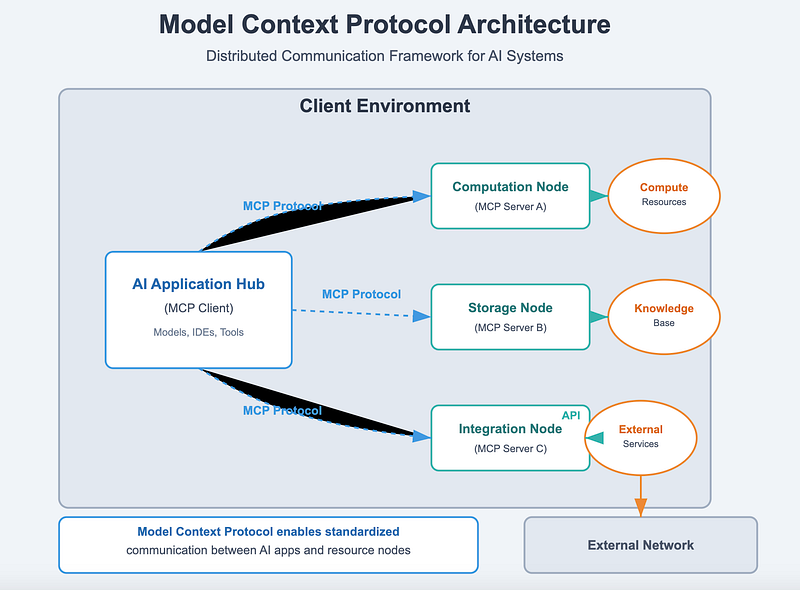
[https://modelcontextprotocol.io/introduction](https://modelcontextprotocol.io/introduction)
This diagram illustrates how the host application (client) communicates with one or more servers, each possibly running different services or models (such as Claude). The protocol standardizes data exchanges, ensuring consistent formatting, security, and efficient routing.
Enabling Multi-Server Connectivity: One of the key strengths of MCP is its ability to enable a host application to connect to multiple servers simultaneously. This allows for a distributed processing approach where different servers handle distinct tasks (e.g., memory management, planning, tool integration), enhancing overall system robustness.
Key Features and Capabilities: - Standardized Data Exchange: A unified format for sending and receiving context and control data. - Scalability: Seamless addition of new servers without disrupting the existing system. - Fault Tolerance: Robust error handling and failover mechanisms. - Security and Authentication: Built-in protocols for secure communication between clients and servers.
MCP Protocol Fundamentals
Understanding MCP’s core components is essential to leveraging it for advanced AI agent architectures.
Core Components
Client: - Initiates requests and maintains session context. - Formats data according to the MCP specifications.
Server: - Processes incoming requests. - Executes tasks like context retrieval, planning, and decision-making. - Returns structured responses to the client.
Protocol Specifications: - Message Format: Defines the structure of requests and responses (e.g., headers, payload, metadata). - Data Types: Standardizes data types (text, JSON, binary, etc.) to ensure consistency across services. - Session Management: Handles connection lifecycles, context synchronization, and state persistence.
Data Flow Between Components
Client to Server: The client sends a request containing context (e.g., conversation history, user query) and any specific instructions or parameters.
Server Processing: The server receives the request, processes it according to its internal logic (which might involve accessing local or remote data sources), and generates a response.
Response Back to Client: The server sends the structured response back, where the client updates its context and may trigger further processing.
Local and Remote Data Integration
MCP facilitates the integration of both local and remote data sources: - Local Data: Cached or session-specific data that the client maintains. - Remote Data: Data retrieved from external servers or APIs via MCP, ensuring the agent always has access to the most up-to-date information.
Security and Authentication
MCP includes built-in security measures: - Encryption: Data transmitted between the client and servers is encrypted. - Authentication: Clients and servers authenticate using secure tokens or certificates. - Access Control: Fine-grained control to ensure only authorized entities can access sensitive data or functionalities.
Leveraging MCP for Agent Architecture
MCP’s standardized communication layer can serve as the foundation for sophisticated agent architectures. By building upon MCP, developers can design agent systems that are both modular and scalable.
Transitioning to an Agent-Oriented Architecture
From Protocol to Agent: With MCP handling communication, agents can be designed as independent modules (e.g., memory, planning, decision-making) that communicate via the protocol.
Enabling Sophisticated Agent Capabilities: - Dynamic Context Handling: Agents can continuously update and share context across modules. - Distributed Processing: Different servers can handle specialized tasks, such as natural language processing (NLP), reasoning, and tool integration. - Resilient Communication: The underlying MCP ensures that all modules remain synchronized, even in complex, multi-step tasks.
How MCP Empowers Agents
The network protocol: - Ensures Consistency: Uniform data formatting and standardized communication eliminate integration issues. - Enables Scalability: New agent capabilities can be added as independent modules connected via MCP. - Facilitates Real-Time Adaptation: Agents can dynamically adjust their behavior based on continuously updated context and state information.
Agent Implementation with MCP
Let’s now examine how to implement an AI agent that leverages MCP. We will cover the component diagram, interface points, and code examples that demonstrate how context management, reasoning, and state maintenance are built on MCP.
Agent Component Diagram
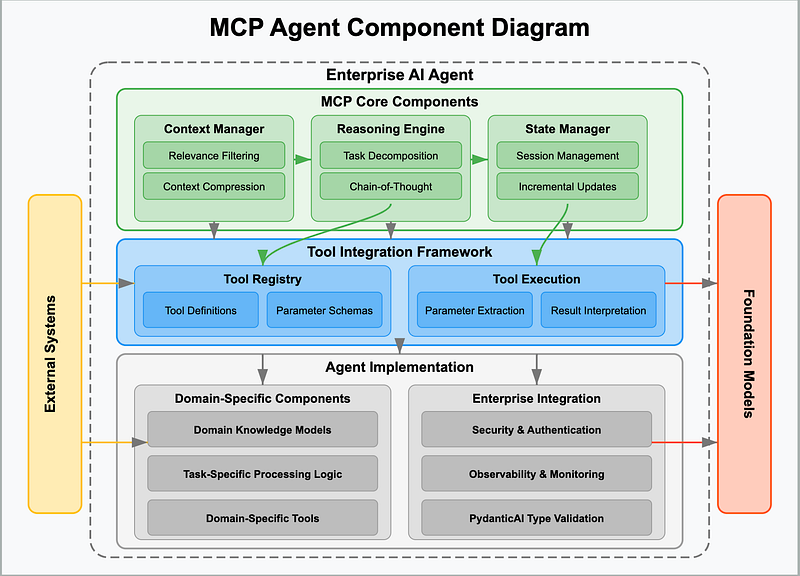
MCP for agents - Context Manager: Aggregates and maintains context. - Memory Module: Stores both transient and persistent information. - Planning Engine: Generates and executes multi-step plans. - Decision-Making Module: Evaluates options and determines the best course of action. - Tool Integration Layer: Connects to external APIs and services. - Communication Interface: Handles MCP-based message exchanges.
Interfacing with the MCP Protocol
Each agent component communicates with others using MCP’s standardized message format. Here’s an example of how the components interface with MCP:
#### Building an MCP-Based Context Manager
Below is a sample Python implementation for a context manager that aggregates short-term and long-term memory. This module forms the backbone of our MCP-based agent.
`
class ContextManager:
def \_\_init\_\_(self):
self.working\_memory = \[\] \# Short-term context
self.persistent\_memory = {} \# Long-term context
def update\_context(self, interaction): """ Update working memory with the latest interaction. Optionally, decide if the information should be persisted. """ self.working\_memory.append(interaction) \# Example: persist if importance exceeds threshold if interaction.get("importance", 0) > 7: key = interaction.get("key", len(self.persistent\_memory)) self.persistent\_memory\[key\] = interaction
def summarize\_context(self): """ Create a summarized context snippet for downstream modules. """ summary = " ".join(\[item\["content"\] for item in self.working\_memory\[-5:\]\]) long\_term\_summary = " ".join(\[str(val\["content"\]) for val in self.persistent\_memory.values()\]) return f"Recent: {summary}\\nLong-Term: {long\_term\_summary}"
def clear\_working\_memory(self):
"""
Clear the short-term working memory after a session or context update.
"""
self.working\_memory = \[\]
`
#### Integrating MCP Components into an Agent
The following code snippet illustrates how to combine various MCP components into a unified agent framework.
`
import anthropic
import time
class MCPAgent: def \_\_init\_\_(self, api\_key): self.client = anthropic.Anthropic(api\_key=api\_key) self.context\_manager = ContextManager() self.toolkit = ToolKit() \# Assume ToolKit is defined similarly to previous examples self.planning\_engine = PlanningEngine(self.client, self.toolkit) self.decision\_engine = DecisionEngine(self.client)
def process\_input(self, user\_input): \# Step 1: Update Context self.context\_manager.update\_context({"content": user\_input, "importance": 5}) context = self.context\_manager.summarize\_context()
\# Step 2: Generate a Plan Based on Context and Input plan\_prompt = f"User Input: {user\_input}\\nContext: {context}\\nGenerate a detailed multi-step plan." plan = self.planning\_engine.create\_plan(plan\_prompt)
\# Step 3: Execute the Plan execution\_results = self.planning\_engine.execute\_plan(plan)
\# Step 4: Decision Making based on Execution Results decision = self.decision\_engine.make\_decision( options=\[result\["result"\] for result in execution\_results\], context=context, criteria=\["accuracy", "relevance", "clarity"\] )
\# Step 5: Formulate and Return Final Response final\_response = f"Decision: {decision\['decision'\]}\\nDetails: {execution\_results}" return final\_response
\# Example usage:
if \_\_name\_\_ == "\_\_main\_\_":
API\_KEY = "YOUR\_API\_KEY\_HERE"
agent = MCPAgent(API\_KEY)
response = agent.process\_input("Find recent research on quantum computing advancements.")
print("Agent Response:\\n", response)
`
Connecting MCP Client to a Community Server (Slack Example)
MCP uses a structured client approach to communicate with servers. You specifically use a high-level client provided by the MCP SDK, which manages initialization, session handling, and invocation of resources, tools, and prompts.
Following MCP [SDK documentation](https://github.com/modelcontextprotocol/servers?tab=readme-ov-file):
1. Install required packages
`
pip install mcp
`
2\. Configure MCP client to connect to the community server (Slack MCP)
MCP server (Slack) configuration (already configured as a Docker container or NPX):
`
{
"mcpServers": {
"slack": {
"command": "docker",
"args": \[
"run",
"-i",
"--rm",
"-e",
"SLACK\_BOT\_TOKEN",
"-e",
"SLACK\_TEAM\_ID",
"mcp/slack"
\],
"env": {
"SLACK\_BOT\_TOKEN": "xoxb-your-bot-token",
"SLACK\_TEAM\_ID": "T01234567"
}
}
}
}
`
#### 3\. Client implementation using MCP client SDK
MCP client with Slack MCP server via stdio_client provided by MCP Python SDK:
`
import asyncio
from mcp import ClientSession, StdioServerParameters
from mcp.client.stdio import stdio\_client
\# Define server parameters to connect via stdio server\_params = StdioServerParameters( command="docker", args=\[ "run", "-i", "--rm", "-e", "SLACK\_BOT\_TOKEN=xoxb-your-bot-token", "-e", "SLACK\_TEAM\_ID=T01234567", "mcp/slack" \], env=None \# Already passed via args, env could also be used separately. )
async def main(): \# Connect using stdio\_client async with stdio\_client(server\_params) as (read, write): async with ClientSession(read, write) as session: await session.initialize()
\# Example: List Slack channels using the community Slack MCP tool channels = await session.call\_tool("slack\_list\_channels", arguments={"limit": 10}) print("Slack Channels:", channels)
\# Example: Post a message to a Slack channel message = await session.call\_tool( "slack\_post\_message", arguments={"channel\_id": "C01234567", "text": "Hello from MCP Client!"} ) print("Message Posted:", message)
\# Run the client
if \_\_name\_\_ == "\_\_main\_\_":
asyncio.run(main())
`
#### How this MCP client connection works:
- Stdio-based Connection: The MCP client initiates a Docker-based MCP community server process via stdio.
- Session Initialization: The client initializes a session, allowing interactions like tool invocation, resource fetching, and prompt handling.
- Tool invocation: You directly call community-provided tools such as slack_list_channels, slack_post_message, etc.
In conclusion, we’ve examined how the Model Context Protocol (MCP) addresses a critical gap — connecting AI models effectively to diverse data sources and business tools. By introducing a universal integration standard, MCP has the potential to significantly simplify and improve the way AI agents maintain context and interact with real-world datasets, reducing the complexity of developing robust, context-aware systems.
While MCP represents an exciting step forward, its long-term impact depends on broader industry adoption beyond Claude and early adopters like Block and Apollo. The willingness of other LLM providers and leading industry players to embrace this open standard will ultimately determine its success and sustainability.
#### Additional reference:
2\. Install pre-built MCP servers through the [Claude Desktop app](https://claude.ai/download)
3\. Build your first MCP server: [quickstart guide](https://modelcontextprotocol.io/quickstart)
4\. Build connectors: [open-source repositories](https://github.com/modelcontextprotocol) and their implementations
— Gaurav
Responses