Implementing RAG : Architecture Guide
Implementing RAG : Architecture Guide
Have you ever wondered how AI systems manage to provide accurate, knowledge-based responses? Today, we’ll dive into the fascinating world… -
Implementing RAG : Architecture Guide
Have you ever wondered how AI systems manage to provide accurate, knowledge-based responses? Today, we’ll dive into the fascinating world of RAG (Retrieval-Augmented Generation) systems, breaking down their architecture into digestible pieces. Whether you’re a developer, architect, or just curious about AI, this guide will help you understand how these systems work together to answer your questions.
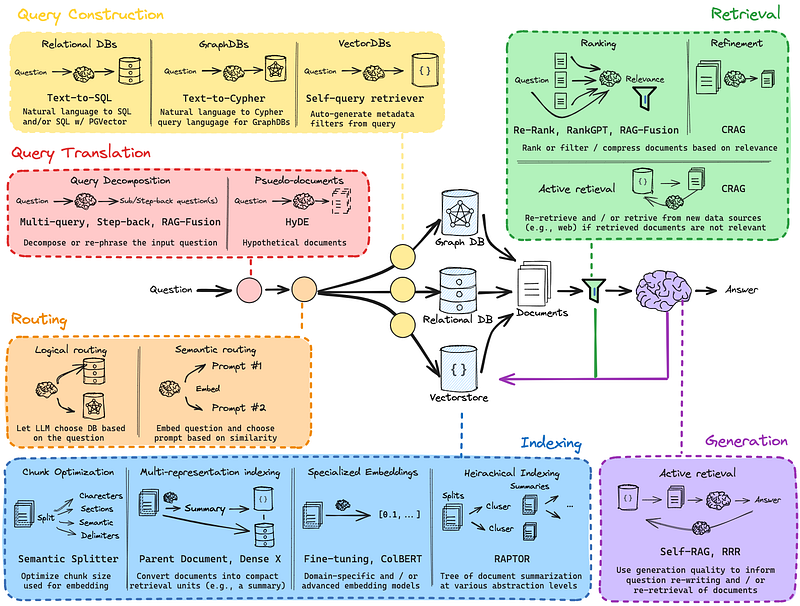
ref: [https://github.com/langchain-ai/rag-from-scratch](https://github.com/langchain-ai/rag-from-scratch)
#### Core Components Implementation
1\. Query Construction Layer
Think of query construction as the system’s way of understanding what you’re asking. It’s like having three different translators, each specialized in their own language:
The first decision point is choosing your query interface based on your data sources:
For Relational Data Sources - Like a librarian who knows exactly which shelf to check - Converts natural language into SQL queries - Perfect for structured data like customer information or product catalogs
`
from langchain import SQLDatabase, SQLDatabaseChain
from langchain.chat\_models import ChatOpenAI
\# Connect to your database db = SQLDatabase.from\_uri("postgresql://user:pass@localhost:5432/dbname")
\# Initialize the SQL Chain sql\_chain = SQLDatabaseChain( llm=ChatOpenAI(temperature=0, model\_name="gpt-4"), database=db, verbose=True )
def natural\_language\_to\_sql(question: str) -> str:
try:
result = sql\_chain.run(question)
return result
except Exception as e:
logger.error(f"SQL generation failed: {e}")
return None
`
For Graph Databases - Imagine a detective connecting dots in a complex case - Translates questions into graph database queries - Ideal for understanding relationships, like social networks or recommendation systems
`
from neo4j import GraphDatabase
from langchain.graphs import Neo4jGraph
def setup\_graph\_query\_engine(): graph = Neo4jGraph( url="bolt://localhost:7687", username="neo4j", password="password" )
\# Define your Cypher query template CYPHER\_TEMPLATE = """ MATCH (n) WHERE n.property CONTAINS $query RETURN n LIMIT 5 """
return graph, CYPHER\_TEMPLATE
`
For Vector Stores - Acts like a smart filter for your photo gallery - Automatically generates relevant search criteria - Great for finding similar content or semantic matches
`
from langchain.vectorstores import ChromaDB
from langchain.embeddings import OpenAIEmbeddings
def setup\_vector\_store(): embeddings = OpenAIEmbeddings() vector\_store = ChromaDB( embedding\_function=embeddings, persist\_directory="./vector\_store" ) return vector\_store
def self\_query\_retrieve(query: str, vector\_store):
\# Generate metadata filters from query
filters = generate\_metadata\_filters(query)
results = vector\_store.similarity\_search\_with\_filters(
query,
filters=filters,
k=5
)
return results
`
#### 2\. Query Translation System
This stage is like having a thoughtful assistant who makes sure they completely understand your request before searching for an answer:
Query Decomposition
- Breaks down complex questions into simpler ones - Example: “Who wrote Harry Potter and what was her inspiration?” becomes:1. “Who wrote Harry Potter?” 2. “What inspired the Harry Potter series?”
Hypothetical Documents (HyDE)
- Creates “perfect answer” templates - Like writing a practice essay before the real thing - Helps guide the search for actual information`
from typing import List
from dataclasses import dataclass
@dataclass class SubQuery: text: str type: str priority: int
class QueryTranslator: def \_\_init\_\_(self, llm): self.llm = llm
def decompose\_query(self, query: str) -> List\[SubQuery\]: \# Use LLM to break down complex queries decomposition\_prompt = f""" Break down this complex query into simpler sub-queries: Query: {query} Return as numbered list of questions. """ result = self.llm.predict(decomposition\_prompt) return self.\_parse\_subqueries(result)
def generate\_hyde\_document(self, query: str) -> str: \# Generate hypothetical document for better retrieval hyde\_prompt = f""" Generate a hypothetical document that would perfectly answer this query: {query} """ return self.llm.predict(hyde\_prompt)
def \_parse\_subqueries(self, llm\_response: str) -> List\[SubQuery\]:
\# Parse LLM response into structured SubQuery objects
\# Implementation depends on your LLM response format
pass
`
#### 3\. Intelligent Routing Implementation
Implement a router that can direct queries to the appropriate data sources:
`
from enum import Enum
from typing import List, Dict
class DataSourceType(Enum): SQL = "sql" GRAPH = "graph" VECTOR = "vector"
class QueryRouter: def \_\_init\_\_(self, embeddings\_model): self.embeddings\_model = embeddings\_model self.source\_embeddings = self.\_initialize\_source\_embeddings()
def route\_query(self, query: str) -> List\[DataSourceType\]: \# Get query embedding query\_embedding = self.embeddings\_model.embed\_query(query)
\# Find most similar data sources scores = self.\_calculate\_similarity(query\_embedding)
\# Return sorted list of data sources return self.\_select\_sources(scores)
def \_initialize\_source\_embeddings(self) -> Dict: \# Pre-compute embeddings for each data source type \# Based on source characteristics pass
def \_calculate\_similarity(self, query\_embedding): \# Calculate cosine similarity with source embeddings pass
def \_select\_sources(self, scores: Dict) -> List\[DataSourceType\]:
\# Select sources based on similarity threshold
pass
`
#### 4\. Indexing System
Implement efficient document processing and indexing:
`
from langchain.text\_splitter import RecursiveCharacterTextSplitter
from langchain.document\_transformers import (
DoctranTextTransformer,
Html2TextTransformer
)
class DocumentProcessor: def \_\_init\_\_(self): self.text\_splitter = RecursiveCharacterTextSplitter( chunk\_size=1000, chunk\_overlap=200, separators=\["\\n\\n", "\\n", ".", "!", "?", ",", " ", ""\] )
def process\_document(self, document: str): \# Clean and normalize text cleaned\_text = self.\_clean\_text(document)
\# Split into chunks chunks = self.text\_splitter.split\_text(cleaned\_text)
\# Generate embeddings for chunks chunk\_embeddings = self.\_embed\_chunks(chunks)
\# Store in vector database self.\_store\_chunks(chunks, chunk\_embeddings)
def \_clean\_text(self, text: str) -> str: \# Implement text cleaning logic pass
def \_embed\_chunks(self, chunks: List\[str\]): \# Generate embeddings using your preferred model pass
def \_store\_chunks(self, chunks, embeddings):
\# Store in your vector database
pass
`
#### 5\. Retrieval Pipeline
Implement a multi-stage retrieval system:
`
from langchain.text\_splitter import RecursiveCharacterTextSplitter
from langchain.document\_transformers import (
DoctranTextTransformer,
Html2TextTransformer
)
class DocumentProcessor: def \_\_init\_\_(self): self.text\_splitter = RecursiveCharacterTextSplitter( chunk\_size=1000, chunk\_overlap=200, separators=\["\\n\\n", "\\n", ".", "!", "?", ",", " ", ""\] )
def process\_document(self, document: str): \# Clean and normalize text cleaned\_text = self.\_clean\_text(document)
\# Split into chunks chunks = self.text\_splitter.split\_text(cleaned\_text)
\# Generate embeddings for chunks chunk\_embeddings = self.\_embed\_chunks(chunks)
\# Store in vector database self.\_store\_chunks(chunks, chunk\_embeddings)
def \_clean\_text(self, text: str) -> str: \# Implement text cleaning logic pass
def \_embed\_chunks(self, chunks: List\[str\]): \# Generate embeddings using your preferred model pass
def \_store\_chunks(self, chunks, embeddings):
\# Store in your vector database
pass
`
#### Performance Considerations
1. Caching Strategy
`
from functools import lru\_cache
from redis import Redis
\# In-memory LRU cache for frequent queries @lru\_cache(maxsize=1000) def cached\_retrieval(query: str) -> List\[str\]: return retrieval\_pipeline.retrieve(query)
\# Redis cache for distributed setups redis\_client = Redis(host='localhost', port=6379, db=0) def cached\_retrieval\_distributed(query: str) -> List\[str\]: cache\_key = f"rag:query:{hash(query)}"
\# Try to get from cache if cached := redis\_client.get(cache\_key): return json.loads(cached)
\# Compute and cache
results = retrieval\_pipeline.retrieve(query)
redis\_client.setex(
cache\_key,
timedelta(hours=24),
json.dumps(results)
)
return results
`
2\. Batch Processing
`
async def batch\_process\_queries(queries: List\[str\]) -> List\[List\[RetrievalResult\]\]:
async with asyncio.TaskGroup() as group:
tasks = \[
group.create\_task(retrieval\_pipeline.retrieve(query))
for query in queries
\]
return \[task.result() for task in tasks\]
`
Monitoring and Evaluation
Implement comprehensive monitoring:
`
from prometheus\_client import Counter, Histogram
\# Metrics QUERY\_LATENCY = Histogram( 'rag\_query\_latency\_seconds', 'Time spent processing queries', \['query\_type'\] ) RETRIEVAL\_COUNT = Counter( 'rag\_retrieval\_total', 'Number of retrievals performed', \['status'\] )
class MonitoredRetrievalPipeline: def \_\_init\_\_(self, base\_pipeline): self.pipeline = base\_pipeline
async def retrieve(self, query: str) -> List\[RetrievalResult\]: try: with QUERY\_LATENCY.labels(query\_type='standard').time(): results = await self.pipeline.retrieve(query)
RETRIEVAL\_COUNT.labels(status='success').inc() return results
except Exception as e:
RETRIEVAL\_COUNT.labels(status='error').inc()
raise
`
#### Deployment Configuration
Example Docker Compose setup:
`
version: '3.8'
services:
vector\_store:
image: chromadb/chroma
environment:
\- ALLOW\_RESET=true
volumes:
\- ./data/vectorstore:/vectorstore
redis\_cache: image: redis:7 ports: \- "6379:6379" volumes: \- ./data/redis:/data
rag\_service:
build: .
depends\_on:
\- vector\_store
\- redis\_cache
environment:
\- OPENAI\_API\_KEY=${OPENAI\_API\_KEY}
\- VECTOR\_STORE\_HOST=vector\_store
\- REDIS\_HOST=redis\_cache
ports:
\- "8000:8000"
`
This implementation guide focuses on practical code patterns and architectural decisions you’ll need to make when building a RAG system. Each component is designed to be modular and extensible, allowing you to swap out implementations based on your specific needs.
Remember to: \- Implement proper error handling throughout the pipeline \- Add comprehensive logging \- Set up monitoring for production deployment \- Implement circuit breakers for external services \- Consider rate limiting for API calls \- Add proper authentication and authorization
Understanding this architecture helps us appreciate the complexity behind seemingly simple AI interactions and points the way toward future improvements in AI knowledge systems.
What aspects of RAG systems interest you the most? Are you building something similar or planning to implement any of these components? Let’s discuss in the comments below!
— Gaurav
Responses