From API Specs to Conversational Interfaces: The CCC Framework for MCP Tools
From API Specs to Conversational Interfaces: The CCC Framework for MCP Tools
Last weekend, I ran an experiment using Cursor where I wired up a local MCP (Model Context Protocol) server. The idea was simple: take any existing API, register its OpenAPI spec into the MCP registry, and have it auto-generate MCP-compliant tools. This setup would then allow any MCP client — like Claude desktop or OpenAI Assistants — to use the API as if it were a native tool.
The prototype worked — it was kind of magical to see Claude calling my local API like it had always known it.
But after evaluating the setup and iterating further, I hit a realization: while registering your APIs into MCP tools is a good starting point, it’s not a good endpoint. Making your APIs “available” isn’t the same as making them usable by an LLM.
The Core Issue: Capability ≠ Comprehension
Here’s the hard truth I uncovered — traditional API design is human-first. It assumes the user knows the capability of each endpoint, the schema, the parameters, the business logic.
LLMs don’t work that way. For them to invoke your API tools meaningfully, they need three things:
- Clarity on capability — What can this API do?
- Context on when to call it — In what scenarios is it relevant?
- Examples to scaffold behavior — How should the request be structured in practice?
Without this triad, even the most well-documented API can become an unusable tool in an LLM’s toolbox.
The CCC Framework Preview
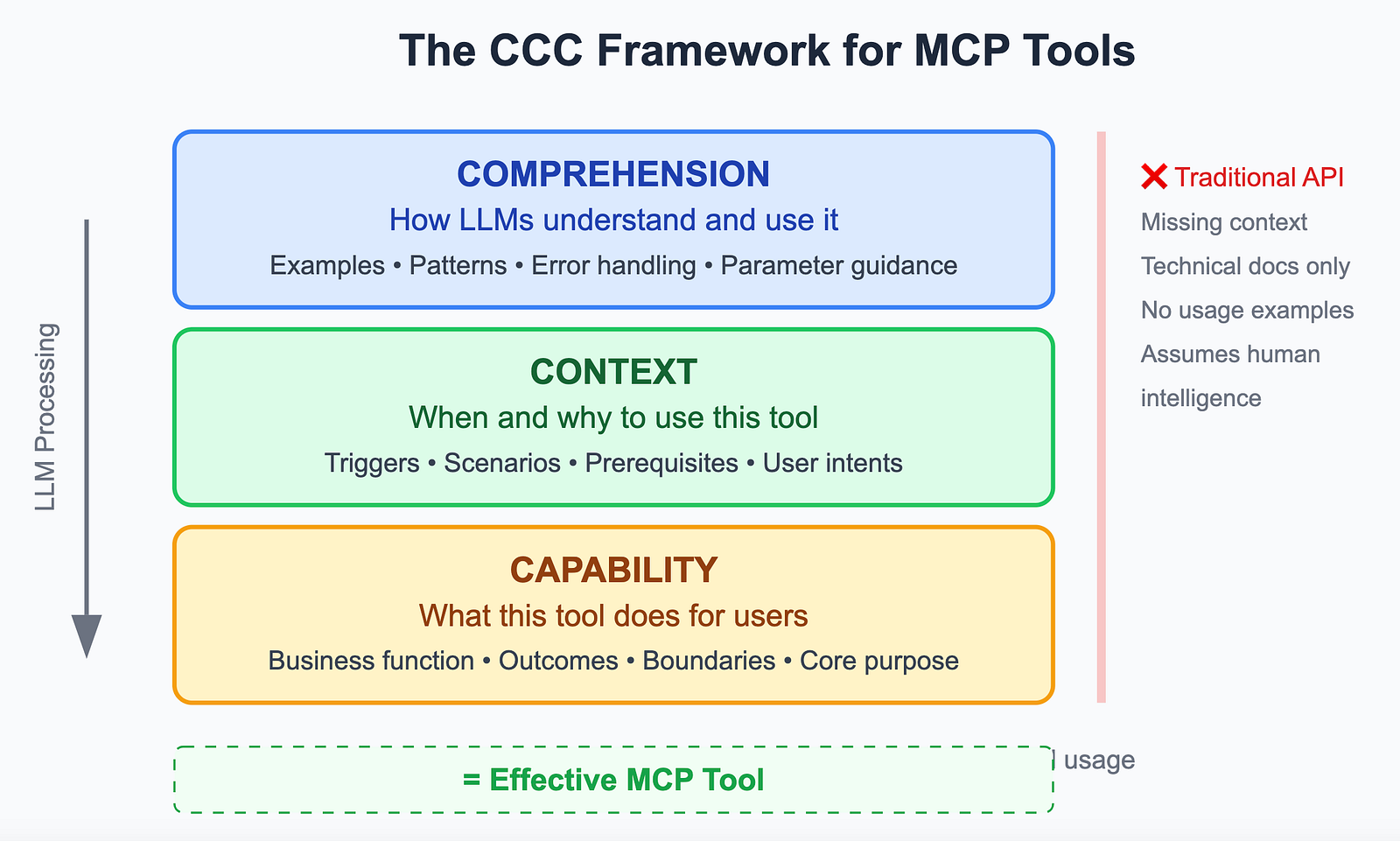
The CCC Framework for MCP Tools
This is the fundamental mismatch between how APIs structure data and operations versus how LLMs need to understand and interact with capabilities.
Part 1: Understanding the Problem
Why Direct API Exposure Fails
Traditional APIs assume human intelligence:
Developers understand business context
Humans infer when to use specific endpoints
Users know how to compose multiple calls
Developers can debug and adapt to errors
LLMs need the CCC Framework:Capability clarity: “This tool manages customer subscription lifecycles”
Contextual triggers: “Use when users mention billing, plan changes, or subscription status”
Comprehension examples: “To upgrade: action=’upgrade’, target_plan=’premium’”
Common Anti-Patterns to Avoid
- 1:1 API Mapping: Creating one MCP tool per API endpoint
- Technical Naming: Using internal API names instead of user-facing concepts
- Raw Data Exposure: Returning unprocessed API responses
- Context Blindness: Tools that don’t understand their role in larger workflows
Part 2: The LLM-First Design Strategy
Strategy: Design for the LLM First, Then Wrap the API
Instead of just MCP-wrapping APIs, the better strategy is:
- Start with Capabilities — Define your app’s core functional capabilities as you would explain them to a junior dev or an AI assistant. Think verbs and use cases, not endpoints.
- Translate Those into Tool Descriptions — Describe each capability in plain language. If your API uploads files, don’t just say “POST /upload” — explain what it does, when it should be used, what kind of inputs are expected, and what it returns.
- Use MCP Tool Spec as Interface Layer — Build a thin tool interface around those capabilities using the MCP tool schema. This is where you map the real API behind the scenes but present an LLM-friendly abstraction.
- Embed Examples — Add example calls and completions in the tool description. These help the model “learn by demonstration.”
- Validate with Real Prompts — Before shipping, test with real prompts in Claude or another MCP client. Watch how the assistant interprets and calls your tools. If it fails, tweak the descriptions, not just the code.
The Outcome: Tools That Feel Native, Not Just Integrated
When you follow this approach, you shift from merely exposing APIs to enabling capabilities. Your tools feel more intuitive and accessible, and agents are far more likely to invoke them appropriately.
This isn’t just about AI-readiness — it’s a new abstraction layer for your app. One where capabilities are humanized, contextualized, and dynamically orchestrated by LLMs.
The Capability-First Methodology
Phase 1: Deep Capability Analysis
Step 1: Start with Capabilities (Think Like You’re Explaining to a Junior Dev)
Instead of starting with your API documentation, start with this exercise:
The Junior Dev Test:
"Hey, here's what our app can do for users..."

❌ "We have a POST /api/users endpoint that accepts JSON payloads"
✅ "Users can create and manage their profiles, including updating personal info and preferences"

❌ "There's a GET /api/reports with various query parameters"
✅ "Users can generate custom reports about their usage, filtered by date ranges and categories"

❌ "The /api/files endpoint handles multipart form uploads"
✅ "Users can upload documents, images, or other files, and we'll process and store them securely"
Capability Inventory Worksheet:
For each major feature in your app:
1. What is the user trying to accomplish?
2. What would success look like from their perspective?
3. What context or information do they need to provide?
4. What might go wrong, and how would they recover?
5. How does this connect to other capabilities?
Step 2: Translate into LLM-Friendly Tool Descriptions
Transform your capabilities into descriptions that an LLM can understand and act upon:
Before (API-First Thinking):
// DON'T: This is just API exposure
const badTools = [
  {
    name: "get_user_by_id",
    description: "GET /api/users/:id",
    parameters: {
      type: "object",
      properties: {
        id: { type: "string" }
      }
    }
  },
  {
    name: "update_user_profile",
    description: "PUT /api/users/:id/profile",
    parameters: {
      type: "object",
      properties: {
        id: { type: "string" },
        data: { type: "object" }
      }
    }
  }
];
After (LLM-First Thinking):
// DO: CCC-Framework optimized tools
const goodTools = [
  {
    name: "manage_user_account",
    description: "Comprehensive user account management for profile updates, preferences, and account status changes.",

    // CAPABILITY: What this does
    capability: {
      primary_function: "Complete user account lifecycle management",
      outcomes: ["View current account details", "Update profile information", "Manage account status"],
      boundaries: "Cannot handle billing/payment operations or delete accounts permanently"
    },

    // CONTEXT: When to use
    context: {
      triggers: [
        "User asks to update profile",
        "Need to check account status",
        "User mentions account problems",
        "Profile information needed for personalization"
      ],
      scenarios: [
        "User onboarding and setup",
        "Profile maintenance requests",
        "Account troubleshooting"
      ],
      prerequisites: "User must be authenticated and account must exist"
    },

    // COMPREHENSION: How to use
    behavioral_examples: [
      {
        scenario: "User wants to update their email",
        parameters: {
          action: "update",
          user_identifier: "current_user_email",
          updates: { email: "new_email@example.com" }
        },
        expected_outcome: "Email updated with confirmation sent to both old and new addresses"
      },
      {
        scenario: "Check if user account is active",
        parameters: {
          action: "view",
          user_identifier: "user@example.com"
        },
        expected_outcome: "Account status and key details returned"
      }
    ],

    parameters: {
      type: "object",
      properties: {
        action: {
          type: "string",
          enum: ["view", "update", "deactivate"],
          description: "What action to perform on the user account"
        },
        user_identifier: {
          type: "string",
          description: "User ID, email, or username - the system will automatically detect the format"
        },
        updates: {
          type: "object",
          description: "For update actions: the fields to modify (only provide fields that should change)"
        }
      },
      required: ["action", "user_identifier"]
    },

    error_patterns: [
      {
        condition: "User not found",
        recovery: "Suggest checking spelling or ask user to verify their account details"
      },
      {
        condition: "Permission denied",
        recovery: "Explain that account modifications require proper authentication"
      }
    ]
  }
];
Let’s look at another example pattern that is focused on workflow or business logic specific tools —
const workflowTool = {
  name: "onboard_new_customer",
  description: "Complete customer onboarding workflow including account creation, initial setup, and welcome communications.",
  handles_internally: [
    "Account validation and creation",
    "Default preferences setup",
    "Welcome email sending",
    "Initial data population",
    "Error recovery for partial failures"
  ],
  parameters: {
    type: "object",
    properties: {
      customer_info: {
        type: "object",
        properties: {
          email: { type: "string", format: "email" },
          name: { type: "string" },
          company: { type: "string" },
          preferences: {
            type: "object",
            description: "Optional: will use intelligent defaults based on company size/industry if not provided"
          }
        },
        required: ["email", "name"]
      },
      onboarding_type: {
        type: "string",
        enum: ["standard", "enterprise", "trial"],
        default: "standard",
        description: "Determines the onboarding flow and default configurations"
      }
    }
  }
};
Step 3: Build the MCP Interface Layer (API Mapping Behind the Scenes)
Create a thin abstraction layer that presents LLM-friendly capabilities while mapping to your actual APIs:
class SaveUserDocumentTool extends CapabilityTool {
  name = "save_user_document";
  description = "Help users save and organize their documents, images, or files...";

  async execute(args: any) {
    const { file_path, destination = "documents" } = args;

    // Behind the scenes: Map to actual API calls
    try {
      // 1. Detect file type and validate
      const fileInfo = await this.analyzeFile(file_path);

      // 2. Create folder if needed (might be POST /api/folders)
      const folder = await this.ensureFolder(destination);

      // 3. Upload file (maps to POST /api/files)
      const uploadResult = await this.apiClient.uploadFile({
        file: file_path,
        folder_id: folder.id,
        metadata: fileInfo
      });

      // 4. Process file (might trigger background jobs)
      await this.triggerFileProcessing(uploadResult.file_id);

      // 5. Return LLM-friendly response
      return {
        success: true,
        message: `Successfully saved ${fileInfo.name} to ${destination} folder`,
        file_details: {
          name: fileInfo.name,
          type: fileInfo.type,
          location: `${destination}/${fileInfo.name}`,
          shareable_link: uploadResult.public_url
        },
        next_actions: ["You can now search for this file or share it with others"]
      };

    } catch (error) {
      return this.handleFileError(error, args);
    }
  }

  private handleFileError(error: any, originalArgs: any) {
    // Transform technical errors into actionable guidance
    if (error.code === 'FILE_TOO_LARGE') {
      return {
        success: false,
        message: "The file is too large to upload. Please try a smaller file or compress it first.",
        suggestions: ["Compress the file", "Split into smaller parts", "Contact support for enterprise limits"]
      };
    }
    // More error transformations...
  }
}
Step 4: Embed Learning Examples in Tool Descriptions
Help the LLM “learn by demonstration” with rich examples:
{
  "name": "generate_user_report",
  "description": "Create customized reports about user activity, usage patterns, or performance metrics",

  "learning_examples": [
    {
      "user_intent": "I want to see how much I've been using the app this month",
      "tool_call": {
        "report_type": "usage_summary",
        "time_period": "current_month",
        "user_id": "current_user"
      },
      "expected_response": "Generated usage report showing 23 hours active time, 145 tasks completed, most active on weekdays",
      "follow_up_capabilities": ["Can break down by specific features", "Can compare to previous months"]
    },
    {
      "user_intent": "Show me a breakdown of my team's productivity last quarter",
      "tool_call": {
        "report_type": "team_productivity",
        "time_period": "last_quarter",
        "scope": "my_team"
      },
      "expected_response": "Team productivity report with individual and aggregate metrics, trends, and insights",
      "follow_up_capabilities": ["Can export to Excel", "Can schedule regular delivery"]
    }
  ],

  "common_patterns": [
    "When users say 'show me', 'I want to see', or 'report on' → likely needs this tool",
    "Time-related keywords (this week, last month, quarterly) → use time_period parameter",
    "Team/group mentions → use scope parameter to filter appropriately"
  ]
}
Step 5: Validate with Real Prompts (The Reality Check)
Before shipping, test your tools with actual conversational scenarios:
Testing Protocol:
1. Set up your MCP server with Claude Desktop
2. Start conversations as different user personas
3. Try to accomplish real tasks without "leading" the LLM
4. Watch for:
   - Does Claude choose the right tool?
   - Are the parameters correct?
   - Does the response make sense?
   - Can Claude handle errors gracefully?
Example Test Conversations:
Test 1 - Natural Usage:
User: "I need to save this contract PDF somewhere safe"
Expected: Claude uses save_user_document with `destination="contracts"`
Reality Check: Did it work? Did Claude understand "somewhere safe"?

Test 2 - Error Recovery:
User: "Upload this 500MB video file"
Expected: Tool returns file size error, Claude suggests alternatives
Reality Check: Does Claude help user solve the problem?

Test 3 - Context Building:
User: "Show me my stats"
Follow-up: "Can you break that down by project?"
Expected: Claude uses context to refine the report
Reality Check: Does the conversation flow naturally?
Iteration Checklist:
- Tool descriptions are clear without being verbose
- Examples cover the most common use cases
- Error messages help users (and Claude) recover
- Tool boundaries feel natural in conversation
- Multiple related requests work together smoothly
Implementation Essentials
Quick Server Setup
import { Server } from '@modelcontextprotocol/sdk/server/index.js';

class CapabilityMCPServer {
  private server: Server;
  private capabilities: Map<string, CapabilityTool>;

  constructor() {
    this.server = new Server({
      name: "capability-server",
      version: "1.0.0"
    });

    this.server.setRequestHandler(ListToolsRequestSchema, async () => ({
      tools: Array.from(this.capabilities.values()).map(cap => cap.getToolDefinition())
    }));

    this.server.setRequestHandler(CallToolRequestSchema, async (request) => {
      const capability = this.capabilities.get(request.params.name);
      return await capability.execute(request.params.arguments || {});
    });
  }
}
CCC-Optimized Tool Design Template
{
  "name": "capability_name",
  "description": "Clear business capability description",

  // CAPABILITY: What this does
  "capability": {
    "primary_function": "Main business function this serves",
    "outcomes": ["What users can expect to achieve"],
    "boundaries": "What this tool cannot do"
  },

  // CONTEXT: When to use this
  "context": {
    "triggers": ["User intents that should invoke this tool"],
    "scenarios": ["Specific situations where this is relevant"],
    "prerequisites": "What must be true before calling this"
  },

  // COMPREHENSION: How to use this
  "behavioral_examples": [
    {
      "scenario": "Common use case description",
      "parameters": { "example": "parameters" },
      "expected_outcome": "What should happen"
    }
  ],

  "parameters": {
    "required": ["essential_params"],
    "optional": ["convenience_params"],
    "smart_defaults": "Explanation of intelligent defaults"
  },

  "error_patterns": [
    {
      "condition": "When this error occurs",
      "recovery": "How LLM should handle and recover"
    }
  ]
}
CCC Framework in Practice
Here’s how the framework translates to actual implementation:
class DocumentManagerCapability extends CapabilityTool {
  name = "manage_user_documents";

  // CAPABILITY: What this does
  description = "Help users organize, find, and manage their documents and files";

  // CONTEXT: When to use this
  getToolDefinition() {
    return {
      name: this.name,
      description: `${this.description}

Use this tool when users want to:
- Save or upload documents
- Find existing files
- Organize documents into folders
- Share documents with others

Examples:
- "Save this contract to my legal folder"
- "Find all my invoices from last month"
- "Share the presentation with my team"`,
      inputSchema: this.schema
    };
  }

  // COMPREHENSION: How it works
  async execute(args: any) {
    const { action, query, destination } = args;

    // Map to actual API calls behind the scenes
    switch (action) {
      case "save":
        return await this.saveDocument(args);
      case "find":
        return await this.searchDocuments(query);
      case "organize":
        return await this.organizeIntoFolder(args);
      default:
        return this.suggestAvailableActions();
    }
  }

  private async saveDocument(args: any) {
    // Behind the scenes: multiple API calls, error handling, user-friendly responses
    try {
      const result = await this.apiClient.uploadFile(args);
      return {
        success: true,
        message: `Document saved successfully to ${args.destination || 'documents'} folder`,
        next_actions: ["You can now search for this file or share it"]
      };
    } catch (error) {
      return this.translateError(error);
    }
  }
}
Production Considerations
Key Success Metrics
Track these to ensure your CCC Framework implementation is working:
- Tool Selection Accuracy: How often LLMs choose the right capability
- Parameter Completion Rate: Quality of arguments provided by LLMs
- Error Recovery Success: How well conversations continue after failures
- Task Completion Rate: End-to-end user goal achievement
Essential Best Practices
Do:
Start with user intent, not API structure
Use semantic names (
manage_customer_accountnotupdate_user_table)Provide rich context and examples in descriptions
Test with real conversational scenarios
Don’t:Mirror your database or API structure directly
Assume LLMs will infer context you haven’t provided
Create overly granular tools that require orchestration
Skip the validation step with real prompts
Key takeaways for successful MCP tool development:
- Understand capabilities before building tools
- Design for LLM comprehension, not developer convenience
- Create semantic abstractions over technical operations
- Build context-aware, error-resilient interfaces
- Test with real LLM interactions
- Monitor and iterate based on usage patterns
The future of MCP tools lies in creating intelligent interfaces that bridge the gap between human intent and system capabilities. By following this capability-first approach, and CCC (C3) framework you’ll build MCP tools that are not just technically functional, but genuinely useful for LLMs helping users accomplish their goals.
Remember: the best MCP tools are invisible to users — they just work naturally within the conversational flow to help accomplish tasks efficiently and effectively.
— Gaurav
Responses