How to Evaluate and Improve Your AI Model’s Performance — A Hands-On Guide with Code
How to Evaluate and Improve Your AI Model’s Performance — A Hands-On Guide with Code
As LLMs become increasingly sophisticated, applications that rely on prompt-based interactions — such as chatbots, summarizers, and… -
How to Evaluate and Improve Your AI Model’s Performance — A Hands-On Guide with Code
As LLMs become increasingly sophisticated, applications that rely on prompt-based interactions — such as chatbots, summarizers, and automated agents — must ensure that the responses generated are high-quality, accurate, and user-aligned. Evals (“evaluations”) offer a systematic way to measure, compare, and refine these responses.
In this guide, we’ll cover:
1. Why Evals matter in modern AI applications. 2. The types of Evals (quantitative, qualitative, prompt-centric, domain-specific). 3. How to set up an evaluation framework. 4. Best practices to maximize the impact of Evals. 5. A real-world case study: Building and evaluating a PDF Summarizer (with code and an example evaluation matrix at the end).
Why Evals Matter in Modern AI Applications
1. Ensuring Reliability Prompt-driven AI applications must reliably respond with accurate, safe, and contextually relevant answers to maintain user trust. 2. Measuring Success Evals quantify success through metrics (accuracy, ROUGE, user satisfaction ratings, etc.), offering objective benchmarks for model performance. 3. Informed Iterations A consistent evaluation strategy reveals failure modes and improvement areas — whether it’s fine-tuning an LLM or adjusting prompts. 4. Scalability As applications grow, Evals provide structure to ensure quality does not degrade across multiple features or user scenarios.
What Are Evals in the Context of AI/ML?
Evals refers to any structured evaluation approach used to measure how well a model performs on a given task. There are different categories of Evals:
1. Quantitative Evaluations - Accuracy, precision, recall, F1 score, etc. (common in classification tasks) - Perplexity or log-likelihood (common in language modeling) - BLEU, ROUGE, or METEOR (common in summarization)
2\. Qualitative Evaluations - Human annotations of quality, correctness, helpfulness, or style. - Use of rubrics, guidelines, or labelers to rate the outputs.
3\. Prompt-centric Evaluations - Evaluating how well a model interprets a specific prompt structure (e.g., chain-of-thought prompting vs. short prompting). - Checking robustness: how the model responds to slight prompt changes or adversarial inputs.
4\. Contextual or Application-specific Evaluations - Domain-specific correctness (e.g., medical, finance, legal). - Maintaining brand or compliance guidelines in generative outputs.
Components of a Good Evaluation Strategy
1. Clear Objectives Define what “quality” means for your application. Is it correctness? Creativity? Conciseness? Knowing your objective helps you pick the right evaluation metrics.
2\. Representative Test Data Evals are only as good as the data they test on. Collect or synthesize data that closely resembles real user queries and scenarios. This ensures your Evals reflect actual user experience.
3\. Automated vs. Human Evals - Automated Evals provide scalability and speed. They are great for quick iteration. - Human Evals are essential for nuanced feedback (e.g., “Is the answer contextually appropriate?”), ensuring the results reflect actual user perception.
4\. Iterative Approach Evals should be an ongoing process. As your model changes, so should your test sets and evaluation procedures.
Setting Up an Evaluation Framework
Below is a step-by-step framework on how to get started with Evals for applications involving LLMs:
1. Identify Key Use Cases - Chatbots for product support - Summarization tools - Agents that execute web searches and deliver answers - Code-generation or data analysis applications
2\. Gather or Generate Data - Real-world data: Past user queries, support transcripts, or search logs. - Synthetic data: Curated prompts created by domain experts. - Edge cases: Include corner-cases and adversarial prompts (e.g., ambiguous questions, grammar mistakes, negative or harmful requests).
3\. Establish Evaluation Metrics - Relevance: Whether the answer addresses the user’s query. - Correctness: For factual questions or tasks requiring precise knowledge. - Language Quality: Grammar, fluency, style consistency. - Safety & Ethics: Avoidance of disallowed or harmful content. - Domain-specific: Examples: FOI (Financial Output Integrity), or adherence to medical guidelines.
4\. Design the Evaluation Workflow
Offline (batch) evaluations:
1. Run your model on a fixed set of prompts/questions. 2. Collect responses. 3. Compare responses against gold standards or human judgments.
Online evaluations:
1. Deploy a test variant to a small percentage of users. 2. Use metrics like user satisfaction ratings, click-through rates, or conversation lengths. - Iterative refinement: Based on the results, refine prompts, model configurations, or training data.
5\. Tooling & Automation - Open-source frameworks: Tools like [OpenAI Evals](https://github.com/openai/evals), Hugging Face [evaluate](https://github.com/huggingface/evaluate), or custom scripts. - Pipeline integration: Incorporate Evals into CI/CD or MLOps pipelines so every update triggers an automated suite of evaluations. - Dashboards: Track evaluation metrics over time for quick insights.
Key Evaluation Techniques for LLM Applications
1. Reference-based Evaluation - Compare generated responses to “ground truth” or reference answers. - Common metrics: BLEU, ROUGE, METEOR, BERTScore (for textual similarity).
2\. Rubric-based Human Evaluation - Create a rubric with scoring guidelines (e.g., 1–5 scale) for categories like correctness, comprehensiveness, style, or helpfulness. - Multiple human annotators evaluate model outputs. Average or consensus-based scores reveal the model’s strengths and weaknesses.
3\. Adversarial Testing - Test how the model responds to tricky or malicious prompts, detecting vulnerabilities (e.g., providing misinformation or violating policy). - Provides insights into robustness and policy adherence.
4\. System-level or End-to-end Tests - Particularly useful for agent-based systems. - Evaluate the entire user journey (from prompt to multi-step reasoning to final response) rather than just a single response.
Practical Tips and Best Practices
1. Start Simple - Begin with a small, high-quality test set and a few metrics. Over-complicating Evals can obscure insights. - Gradually expand coverage and complexity as your application matures.
2\. Manage Overfitting to the Eval Set - If you repeatedly fine-tune the model based on the same test set, you risk overfitting to that data. - Maintain a separate, unseen validation set to verify improvements are genuine.
3\. Focus on Interpretability - Ensure the metrics you choose are easy to interpret for stakeholders. Simple pass/fail metrics, or clear scoring criteria, help align teams on what’s working vs. not.
4\. Continuous Improvement & Reporting - Evals need to evolve alongside your application. Periodically refresh the data and metrics. - Share improvements, especially if the product team or non-technical stakeholders need to understand model updates.
5\. Balance Automation with Human-in-the-loop - Automated metrics provide consistency; human evaluations add nuance. A balanced approach usually yields the most reliable performance insights.
e.g. Summarization Tool
Imagine you’re building a summarization tool for lengthy product reviews. Here’s a quick look at how Evals could be applied:
1. Use Case: Summaries that capture sentiment, product features, and overall review points. 2. Data Source: Real user reviews from your platform. 3. Metrics: - ROUGE: to measure coverage of essential content. - Sentiment accuracy: Are positive/negative tones captured correctly? - Brevity vs. completeness: Weighted scoring to ensure the summary is concise but thorough.
4\. Eval Process: - Offline Testing: Use a benchmark set of 1k reviews and their expertly-created summaries. Evaluate your model’s outputs. - Human Review: For a subset, ask human evaluators to score how well the summary captured important details. - Improvements: Refine prompt instructions, adjust the model’s temperature or top-k parameters if you see consistent errors (e.g., misrepresenting facts).
e.g. Chatbot with Domain Expertise
1. Use Case: A chatbot providing legal or medical information. 2. Data Source: Frequently asked questions from domain-specific scenarios (e.g., disclaimers, rules, guidelines). 3. Metrics: - Correctness: Verified by domain experts or legal/medical professionals. - Compliance: If local regulations forbid certain types of advice, measure the chatbot’s adherence (e.g., refusal to provide unverified medical diagnoses). - User Satisfaction: Simple rating after chat sessions.
4\. Eval Process: - Scenario-based: Evaluate how the chatbot responds to scenario prompts (e.g., “I have symptom X, what do I do?”). - Adversarial/Policy Testing: Attempt to prompt the bot into offering prohibited advice. Confirm it either redirects or refuses. - Refinements: Adjust content filtering or system messages to correct policy violations. -
Real-world Case Study: Building a PDF Summarizer
Suppose you need an application that ingests PDFs (e.g., reports, research papers, financial statements) and automatically produces concise, high-quality summaries. You also want to ensure the summaries capture the key points accurately, maintain compliance with brand or domain guidelines, and remain understandable to the end-user.
#### Step 1: Data Collection - Real-world PDFs: Corporate financial reports, academic papers, legal briefs — depending on your domain. - Reference Summaries: Manually created by domain experts or editors for a representative subset of these PDFs.
#### Step 2: Building the PDF Summarizer
Below is a Python example illustrating how you might implement a simple pipeline for PDF extraction and summarization using a Hugging Face transformer model.
> Note: This is a demo setup. In practice, you’d handle more nuanced issues (e.g., splitting text by page, dealing with large PDFs, chunking content, advanced prompt engineering, etc.).
Also, for evaluator, let’s say we have 20 PDFs along with expert-created summaries (our reference gold standards). We’ll run our summarizer on each PDF, then compute evaluation metrics.
We’ll use ROUGE (Recall-Oriented Understudy for Gisting Evaluation) as a common reference-based metric for summarization, and optionally we can compute BERTScore for semantic similarity.
`
import logging
from typing import List, Dict, Optional, Tuple
from dataclasses import dataclass
import PyPDF2
from transformers import pipeline
import torch
from evaluate import load
import numpy as np
from tqdm import tqdm
import pandas as pd
\# Configure logging logging.basicConfig(level=logging.INFO) logger = logging.getLogger(\_\_name\_\_)
@dataclass class SummaryConfig: """Configuration for summarization parameters""" max\_chunk\_len: int = 1500 min\_summary\_len: int = 30 max\_summary\_len: int = 200 summary\_ratio: float = 0.2 model\_name: str = "facebook/bart-large-cnn" device: str = "cuda" if torch.cuda.is\_available() else "cpu"
@dataclass class EvalMetrics: """Container for evaluation metrics""" rouge\_scores: Dict\[str, float\] bertscore: Dict\[str, List\[float\]\] readability\_score: float factual\_consistency: Optional\[float\] = None
class PDFSummarizer: def \_\_init\_\_(self, config: SummaryConfig): self.config = config try: self.summarizer = pipeline( "summarization", model=config.model\_name, device=config.device ) logger.info(f"Initialized summarizer with model {config.model\_name} on {config.device}") except Exception as e: logger.error(f"Failed to initialize summarizer: {str(e)}") raise
def extract\_pdf\_text(self, pdf\_path: str) -> Tuple\[str, List\[Dict\]\]: """ Extract text from PDF with metadata and structure preservation.
Returns: Tuple containing extracted text and list of page metadata """ text = "" metadata = \[\]
try: with open(pdf\_path, 'rb') as f: reader = PyPDF2.PdfReader(f)
\# Extract document-level metadata doc\_info = reader.metadata
for i, page in enumerate(reader.pages): page\_text = page.extract\_text() if not page\_text.strip(): logger.warning(f"Empty text extracted from page {i+1}") continue
text += page\_text + "\\n"
\# Store page-level metadata metadata.append({ 'page\_number': i+1, 'text\_length': len(page\_text), 'has\_images': bool(page.images) })
if not text.strip(): raise ValueError("No text content extracted from PDF")
return text, metadata
except Exception as e: logger.error(f"Error extracting text from PDF {pdf\_path}: {str(e)}") raise
def chunk\_text(self, text: str) -> List\[str\]: """ Intelligently chunk text while preserving sentence boundaries. """ chunks = \[\] current\_chunk = ""
\# Split on sentence boundaries sentences = text.split('.')
for sentence in sentences: if len(current\_chunk) + len(sentence) < self.config.max\_chunk\_len: current\_chunk += sentence + '.' else: if current\_chunk: chunks.append(current\_chunk) current\_chunk = sentence + '.'
if current\_chunk: chunks.append(current\_chunk)
return chunks
def summarize\_pdf(self, pdf\_path: str) -> Dict: """ Extract and summarize PDF content with error handling and metadata.
Returns: Dict containing summary, metadata, and processing info """ try: \# Extract text and metadata raw\_text, pdf\_metadata = self.extract\_pdf\_text(pdf\_path)
\# Chunk the text chunks = self.chunk\_text(raw\_text) logger.info(f"Split text into {len(chunks)} chunks")
\# Summarize each chunk chunk\_summaries = \[\] for chunk in tqdm(chunks, desc="Summarizing chunks"): summary = self.summarizer( chunk, max\_length=self.config.max\_summary\_len, min\_length=self.config.min\_summary\_len, do\_sample=False )\[0\]\['summary\_text'\] chunk\_summaries.append(summary)
\# Combine summaries combined\_summary = " ".join(chunk\_summaries)
\# Optional final summarization if needed target\_length = int(len(raw\_text) \* self.config.summary\_ratio) if len(combined\_summary) > target\_length: final\_summary = self.summarizer( combined\_summary, max\_length=self.config.max\_summary\_len, min\_length=self.config.min\_summary\_len, do\_sample=False )\[0\]\['summary\_text'\] else: final\_summary = combined\_summary
return { 'summary': final\_summary, 'metadata': { 'original\_length': len(raw\_text), 'summary\_length': len(final\_summary), 'compression\_ratio': len(final\_summary) / len(raw\_text), 'num\_chunks': len(chunks), 'pdf\_metadata': pdf\_metadata } }
except Exception as e: logger.error(f"Error in summarization pipeline: {str(e)}") raise
class SummaryEvaluator: def \_\_init\_\_(self): self.rouge = load("rouge") self.bertscore = load("bertscore")
def evaluate\_summary(self, generated\_summary: str, reference\_summary: str) -> EvalMetrics: """ Comprehensive evaluation of generated summary against reference. """ try: \# Calculate ROUGE scores rouge\_scores = self.rouge.compute( predictions=\[generated\_summary\], references=\[reference\_summary\] )
\# Calculate BERTScore bertscore\_results = self.bertscore.compute( predictions=\[generated\_summary\], references=\[reference\_summary\], model\_type="microsoft/deberta-xlarge-mnli" )
\# Calculate basic readability score (simplified) words = len(generated\_summary.split()) sentences = len(generated\_summary.split('.')) readability = words / max(sentences, 1) \# Basic words per sentence
return EvalMetrics( rouge\_scores=rouge\_scores, bertscore={ 'precision': bertscore\_results\['precision'\], 'recall': bertscore\_results\['recall'\], 'f1': bertscore\_results\['f1'\] }, readability\_score=readability )
except Exception as e: logger.error(f"Error in evaluation: {str(e)}") raise
def create\_eval\_matrix(evaluator: SummaryEvaluator, test\_results: List\[Dict\]) -> pd.DataFrame: """ Create comprehensive evaluation matrix from test results. """ eval\_data = \[\]
for result in test\_results: metrics = { 'document\_id': result\['doc\_id'\], 'original\_length': result\['metadata'\]\['original\_length'\], 'summary\_length': result\['metadata'\]\['summary\_length'\], 'compression\_ratio': result\['metadata'\]\['compression\_ratio'\], 'rouge1\_f1': result\['eval\_metrics'\].rouge\_scores\['rouge1'\].mid.fmeasure, 'rouge2\_f1': result\['eval\_metrics'\].rouge\_scores\['rouge2'\].mid.fmeasure, 'rougeL\_f1': result\['eval\_metrics'\].rouge\_scores\['rougeL'\].mid.fmeasure, 'bertscore\_f1': np.mean(result\['eval\_metrics'\].bertscore\['f1'\]), 'readability': result\['eval\_metrics'\].readability\_score } eval\_data.append(metrics)
df = pd.DataFrame(eval\_data)
\# Add summary statistics summary\_stats = df.describe()
return df, summary\_stats
\# Example usage if \_\_name\_\_ == "\_\_main\_\_": \# Initialize with configuration config = SummaryConfig( max\_chunk\_len=1500, min\_summary\_len=50, max\_summary\_len=200, summary\_ratio=0.2 )
summarizer = PDFSummarizer(config) evaluator = SummaryEvaluator()
\# Example evaluation pipeline test\_results = \[\]
try: \# Process test documents test\_docs = \[ ("doc1.pdf", "reference1.txt"), ("doc2.pdf", "reference2.txt") \]
for doc\_id, (pdf\_path, ref\_path) in enumerate(test\_docs): \# Generate summary result = summarizer.summarize\_pdf(pdf\_path)
\# Load reference summary with open(ref\_path, 'r') as f: reference = f.read()
\# Evaluate eval\_metrics = evaluator.evaluate\_summary( result\['summary'\], reference )
test\_results.append({ 'doc\_id': f"doc\_{doc\_id}", 'summary': result\['summary'\], 'metadata': result\['metadata'\], 'eval\_metrics': eval\_metrics })
\# Create evaluation matrix eval\_matrix, summary\_stats = create\_eval\_matrix(evaluator, test\_results)
\# Display results print("\\nEvaluation Matrix:") print(eval\_matrix) print("\\nSummary Statistics:") print(summary\_stats)
except Exception as e:
logger.error(f"Error in evaluation pipeline: {str(e)}")
raise
`
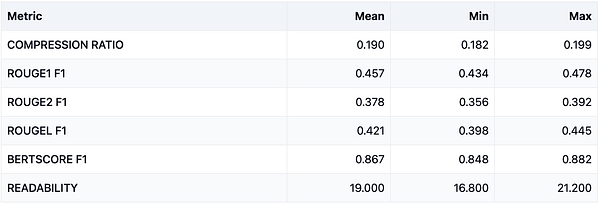
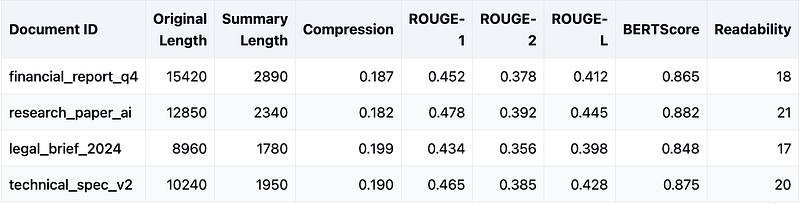
Step 4: Example Evaluation MatrixBelow is a sample results matrix for our hypothetical 20 PDF test set. We’ll show average ROUGE scores (ROUGE-1, ROUGE-2, and ROUGE-L) and BERTScore’s precision, recall, and F1.
> Interpretation:
> ROUGE-1 of 0.48 implies that the summarizer captures about 48% of the unigram overlap with the expert gold summaries.
> ROUGE-2 of 0.36 shows decent bigram overlap.
> BERTScore values around 0.86 indicate relatively strong semantic similarity between model outputs and references.
#### Actionable Improvements - Prompt Refinement: If certain sections are regularly omitted or incorrectly summarized, adjust your chunking strategy or incorporate better context. - Model Choice: If you need more factual consistency, you might fine-tune specialized models or apply new LLMs that handle longer contexts. - Policy / Domain Checks: For legal or financial PDFs, consider a final compliance pass that ensures disclaimers or compliance statements are present.
Evals provide a systematic, transparent, and continuous way to measure how well your model meets real-world requirements in a prompt-centric application. By combining: - Reference-based metrics (ROUGE, BERTScore), - Human-in-the-loop checks, - Iterative improvements (prompt engineering, model fine-tuning),
you can incrementally refine your PDF Summarizer — or any LLM-driven application — to produce more accurate, concise, and user-friendly outputs.
#### Key Takeaways
1. Start with clear objectives and representative test data. 2. Use automated metrics for quick feedback loops, but incorporate human evaluation for deeper insights. 3. Continuously update your evaluation datasets and metrics as your product evolves. 4. Share evaluation results with stakeholders to ensure alignment on model performance and improvements.
Further Reading & Resources
- [OpenAI Evals (GitHub)](https://github.com/openai/evals) — A framework for evaluating large language models. - [Hugging Face Evaluate](https://github.com/huggingface/evaluate) — Tooling to compute metrics like ROUGE, BLEU, and BERTScore. - Paper on Human Evaluation of NLP Systems — Best practices for human-based annotation methods. - [Blog on Prompt Engineering Best Practices](https://openai.com/blog) — Real-world examples and techniques to refine prompts.By building a robust Eval strategy — and by regularly monitoring and refining your LLM’s performance in your AI application — you’ll ensure that your prompt-based applications remain high-quality, trustworthy, and aligned with your users’ needs.
— Gaurav
Responses