How to Run DeepSeek-R1 Efficiently: A Step-by-Step Guide
How to Run DeepSeek-R1 Efficiently: A Step-by-Step Guide
DeepSeek-R1 is a powerful open-source AI model, but running it efficiently requires careful hardware selection, optimization, and… -
How to Run DeepSeek-R1 Efficiently: A Step-by-Step Guide
DeepSeek-R1 is a powerful open-source AI model, but running it efficiently requires careful hardware selection, optimization, and deployment strategies. Whether you want to run it locally on a Mac, on a cloud GPU, or optimize performance for large-scale use, this guide will walk you through everything step by step.
1) Running DeepSeek-R1 on a Mac Using Ollama (Best for Local Use)
If you’re on macOS (Intel or Apple Silicon), Ollama is the easiest way to get started with smaller DeepSeek-R1 models like the 7B or 14B distilled versions.
🔹 Install Ollama
`
curl -fsSL https://ollama.com/install.sh | sh
`
🔹 Run a Smaller Distilled Model (DeepSeek-R1 7B)
`
ollama run deepseek-r1:7b
`
Here is a snapshot of getting in running with ollama in few seconds, however even 7b model is very slow on my machine as you can see, it was still writing …
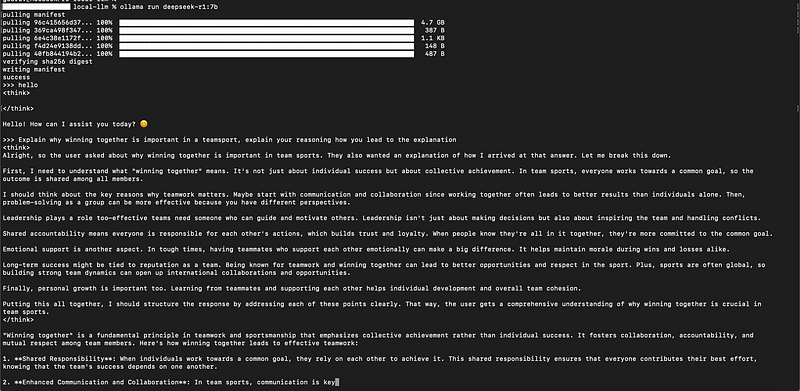
✅ Optimized for macOS with Apple Metal backend. ✅ Simple one-line execution. ✅ Best for chatbots, small-scale experiments. ❌ Not suitable for full 487GB DeepSeek-R1 model.
2) Running DeepSeek-R1 on a Local GPU with vLLM (Best for Speed & Optimization)
If you have an NVIDIA GPU (RTX 3090/4090, A100, or H100), vLLM is the best way to run DeepSeek-R1 locally with high efficiency.
🔹 Install vLLM
`
pip install vllm
`
🔹 Run DeepSeek-R1 as a Local API
`
vllm.entrypoints.openai.api\_server --model deepseek-ai/deepseek-r1
`
🔹 Query the API
`
import requests
response = requests.post(
"http://localhost:8000/v1/completions",
json={"model": "deepseek-ai/deepseek-r1", "prompt": "What is AI?", "max\_tokens": 100}
)
print(response.json())
`
✅ Faster inference with optimized attention mechanisms. ✅ Supports multi-GPU parallelism. ❌ Needs a high-end NVIDIA GPU (A100 recommended).
3) Running DeepSeek-R1 Locally (Official Recommendation)
DeepSeek-AI provides [official recommendations](https://github.com/deepseek-ai/DeepSeek-R1?tab=readme-ov-file#6-how-to-run-locally) for running DeepSeek-R1 locally:
🔹 Running DeepSeek-R1-Distill Models
DeepSeek-R1-Distill models can be utilized in the same manner as Qwen or Llama models.
#### Using vLLM for Optimized Inference
`
vllm serve deepseek-ai/DeepSeek-R1-Distill-Qwen-32B \--tensor-parallel-size 2 \--max-model-len 32768 \--enforce-eager
`
#### Using SGLang for Serving
`
python3 -m sglang.launch\_server \--model deepseek-ai/DeepSeek-R1-Distill-Qwen-32B \--trust-remote-code \--tp 2
`
🔹 Recommended Configurations
To ensure the best performance:
- Set temperature between 0.5–0.7 (0.6 recommended) to prevent incoherent outputs.
- Avoid using a system prompt; provide all instructions in the user prompt.
- For math problems, add: "Please reason step by step, and put your final answer within \boxed{}."
- When evaluating performance, run multiple tests and average the results.
✅ Optimized for structured reasoning and efficient response generation.
4) Running DeepSeek-R1 on Cloud GPUs (Best for Large Models)
For running the full DeepSeek-R1 (487GB model), cloud GPUs are the best choice.
🔹 Recommended Cloud Providers
- Vast.ai (Cheapest spot GPU instances) - Lambda Labs (Affordable A100 & H100 instances) - RunPod.io (Good balance between cost and availability) - AWS/GCP (Enterprise-grade but expensive)🔹 Running on RunPod (Example)
`
runpodctl create instance \--gpu=A100 --image=deepseek-r1
`
✅ Best for large-scale inference. ✅ No need to buy expensive hardware. ❌ Ongoing cloud costs.
5) Deploying DeepSeek-R1 on AWS SageMaker or VM (Self-Hosting the Model)
For enterprise-grade self-hosting, AWS SageMaker or a dedicated VM is a great option.
🔹 Deploying on AWS SageMaker
`
from sagemaker.huggingface import HuggingFaceModel
model \= HuggingFaceModel(
model\_data="s3://your-model-bucket/deepseek-r1.tar.gz",
role="your-sagemaker-role",
transformers\_version="4.26",
pytorch\_version="1.13",
py\_version="py39"
)
predictor = model.deploy(instance\_type="ml.g5.2xlarge")
`
✅ Scalable, managed solution for AI inference. ✅ Automatic model versioning and deployment. ❌ Higher cost compared to self-hosted solutions.
🔹 Running on a Dedicated VM (GCP, Azure, or On-Premises)
For those who prefer full control, deploy DeepSeek-R1 on a high-end virtual machine.
`
pip install torch transformers accelerate
python3 run\_model.py --model deepseek-ai/deepseek-r1 --device cuda
`
✅ More cost-effective for long-term use. ✅ No vendor lock-in. ❌ Requires manual setup and maintenance.
6) Choosing the Right Hardware for Running DeepSeek-R1
Setup Best For Recommended Hardware
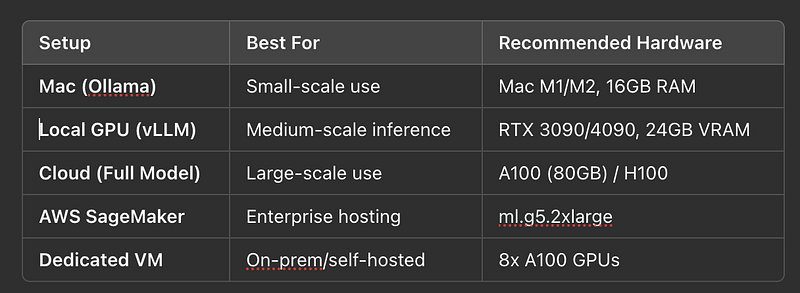
✅ Pick hardware based on your use case!
7) Optimization Techniques for Better Performance
🔹 a) Quantization (Reduce Memory Usage)
Convert model to 4-bit or 8-bit precision for lower VRAM consumption.
`
from transformers import AutoModelForCausalLM, AutoTokenizer, BitsAndBytesConfig
bnb\_config = BitsAndBytesConfig(load\_in\_4bit=True)
model = AutoModelForCausalLM.from\_pretrained("deepseek-ai/deepseek-r1", quantization\_config=bnb\_config)
`
✅ Reduces memory by ~4x.
🔹 b) Offloading & Parallelism
Use FSDP (Fully Sharded Data Parallel) or DeepSpeed to distribute model across multiple GPUs.
`
pip install deepspeed
from deepspeed import init\_inference
model = init\_inference(model, dtype=torch.float16, replace\_with\_kernel\_inject=True)
`
✅ Runs on multiple GPUs efficiently.
8) Deploying DeepSeek-R1 as a Scalable API
For production-ready applications, deploy DeepSeek-R1 using FastAPI + vLLM.
🔹 Deploying a Local API
`
from fastapi import FastAPI
import requests
app = FastAPI()
@app.post("/generate")
def generate\_text(prompt: str):
response = requests.post(
"http://localhost:8000/v1/completions",
json={"model": "deepseek-ai/deepseek-r1", "prompt": prompt, "max\_tokens": 150}
)
return response.json()
\# Run with: uvicorn script:app --reload
`
✅ Allows multiple users to access the model.
🔮 Summary
- For Mac users → Ollama (7B models) - For local GPUs → vLLM (Needs NVIDIA GPU) - For cloud GPUs → Vast.ai, Lambda Labs, RunPod - For scaling → Quantization, Model Parallelism, vLLM🚀 Want to fine-tune DeepSeek-R1? Stay tuned for the next guide!
— Gaurav
Responses