Serverless Product Integration In Google Apps Script
Serverless Product Integration In Google Apps Script
Digressing a little from “I have to complete this!” and pursued one of my seasonal interest of product integration, I picked up an… -
Serverless Product Integration In Google Apps Script
`
Implement, extend and schedule a serverless product integration with [Google Apps Script](https://developers.google.com/apps-script/)
`
Digressing a little from “I have to complete this!” and pursued one of my seasonal interest of product integration, I picked up an interesting problem —
> If every application provides the REST APIs or open Web-Services, then why is it still hard to have the seamless digital transformation with the inter-products’ integration, or open-connect APIs solution for various products?
I am not saying, there are no integration service providers, there are and they ask you to pay. Lately I have been working with a lot of cloud-hosted solution, like IFFT, Zapier, SnapLogic, Workato… and the reasons, they are successful, are;
1. FIRST: There is a real need for the inter-products integration! 2. Their solution is cloud-hosted. 3. You don’t need to maintain the API complexity and infrastructure. 4. If a product has an API, they probably have a solution, so kinda interconnected products’ ecosystem. 5. They all provide easy scheduling and triggers.
These providers also make it easy to set up an inter-products integration for no-IT person. It is easy to set triggers, filters and define actions based on an event. Few scenarios may be — Getting the leads from Google Analytics and charting it down it to a dashboard or Getting the user analytics to your KPI System or going further, doing email automation on alerts.
Wait, there is more to that as last few months have been a thrilling time period, I have led a strategic product integration and an enterprise chatbot development till the finish line (an app store publishing, checked!) , delivered a tech talk on a big portal- [Microsoft Build 2018](https://www.microsoft.com/en-us/build) and have been working on other sets of challenging problems related to product integration. And it develops a greater sense of understanding that —
> A customer doesn’t see N-products, they see them as one product.
I believe that they are right and equally right to have that belief. They want an end to end solution. So it doesn’t matter which cloud services are providing the solution to them.
> As far as if the services are accessible, the services must be integrated.
Back to the service providers, I can say that these platforms provide really good start and solve the purpose, smoothly in a non-IT way. But when you talk about the transformation, they are not there yet. The requirement of data-flow varies from the application to application, it requires more than if->then->do, as the transformation progresses, it increases complexity.
The open question here: How can I have more control over the data and it’s processing?
Let’s deconstruct the providers’ platform and devise a solution, so far we have:
1. Bunch of APIs which are accessible over the different authentications. 2. Few servers for your integration deployment and scheduling.
You can ask —
Isn’t it the whole point of using them?
I don’t want to have the cloud solution, the cost of managing servers ( or database) etc-. But I know my functions, logic, and calls — Good Enough!
> What about having a serverless deployment and put our functions there?
> YES, I want that!!!
Great, we know the problem and now, we know the direction —
> ~Serverless Product Integration~
There are so many options available when it comes to serverless deployments, like [Amazon Lambda with the cloud watch](https://console.aws.amazon.com/lambda), [Microsoft Azure functions,](https://azure.microsoft.com/en-us/services/functions/) [IBM OpenWhisk](https://console.bluemix.net/openwhisk/), [Google Cloud Serverless](https://cloud.google.com/serverless/) and there are the bunch of serverless examples, you can see the full list [here](https://github.com/serverless/examples). I work with all of these services providers, they are really great.
And there is one which is not made available and marketed as the serverless option but it’s my favorite. —
> [Google Apps Script](https://developers.google.com/apps-script/)
If you have worked with G Suite Services, you have probably come across that Tools->Script editor option. In the apps script, you can build a scheduled service and have your product integrated, in-place with the “A LITTLE” things changed in this script.
I am really excited about sharing the implementation. And it all started because of my objective — Deliver a chatbot that understands you! To automate one of the result (metric) update for this KR, I approached this implementation.
> The product integration problem is not a just a problem of seamless data flowing from one system to another, rather it is fine dining restaurant served delicious dish that requires all the small recipes well prepared, executed and served!
The implementation works as a pipeline of several small tasks (recipes), and once a task from the pipeline completes, you complete that stage in the pipeline before moving to the next recipe. And finally, entire pipelines execute to complete the product integration.
I have taken a very vanilla approach to releasing the first cut, but once you get the idea, you can extend it as per your need by publishing the new recipe in the recipes library.I will post a link that will have full code that you could use and extend. But for, now we will talk about one of the sample pipeline with the two recipes. The pipeline is about getting weekly activity count from Mixpanel and pushes it one of my results in WorkBoard.
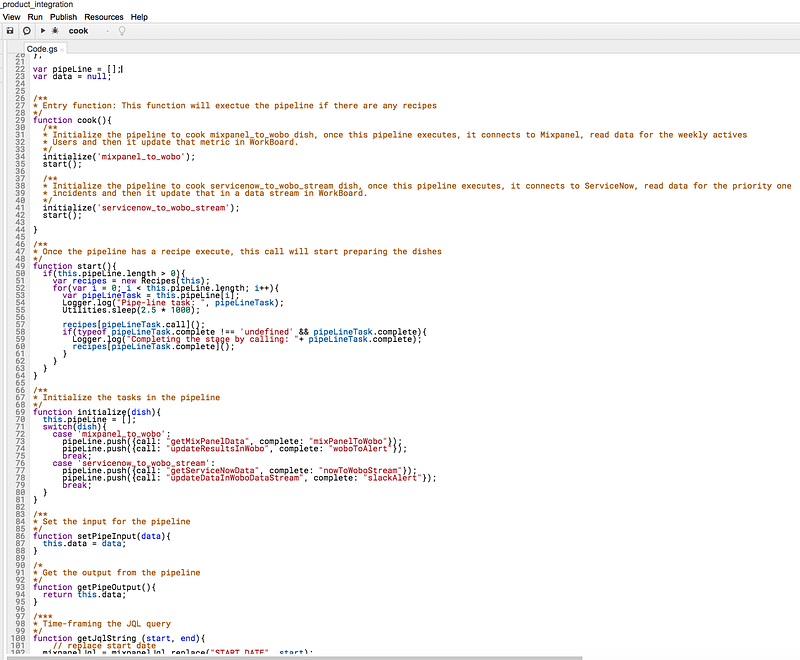
Entry function to cook the recipes
The other pipeline in the above screenshot is: getting the data from ServiceNow and sending it to WorkBoard’s data stream and alerting on Slack.
The implementation starts with cook(…) that prepares recipes in the pipeline by calling initialize(…). Once it is initialized, the cook method executes the pipeline in sequential order, and recipes complete itself by setting the pipeOutput.
The two recipes from the Recipes library, are getMixPanelData(…) — getting data from Mixpanel and updateResultsInWobo(…) — to post data WorkBoard, And these two recipes are glued with the message translation — mixPanelToWobo(…). The message translator creates the required mapping of response to next stage in the pipeline.
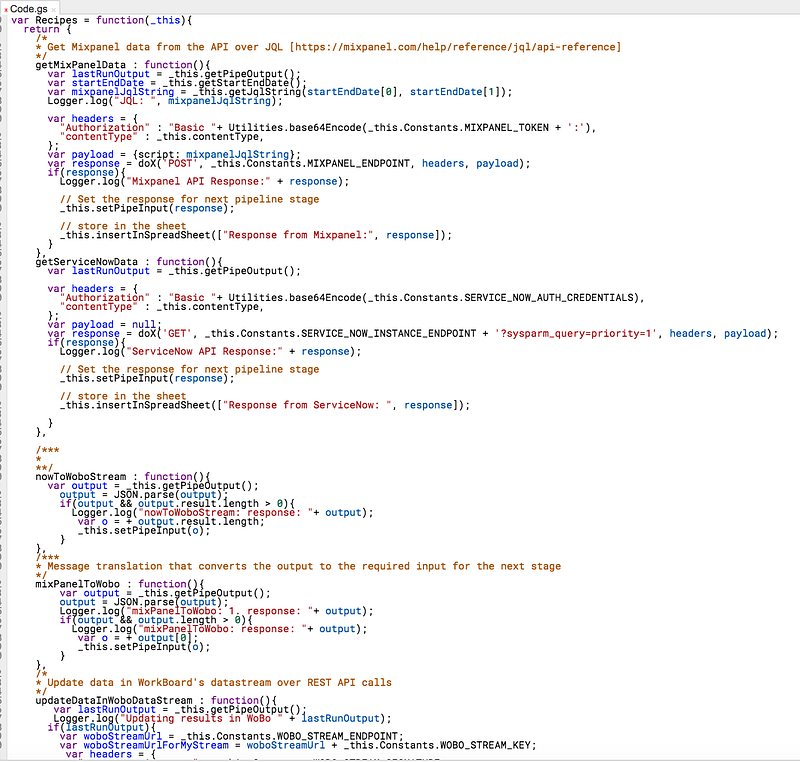
integration recipes
Both these recipes perform API call and record the execution results in the Google spreadsheet (that is the part, I liked most!):
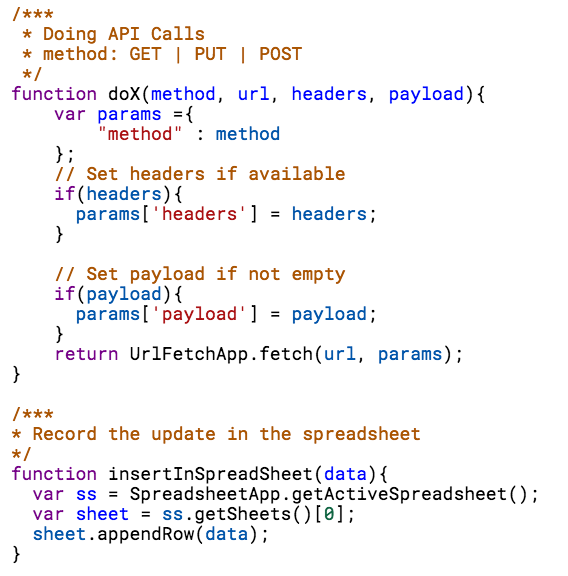
API call and Writing to a spreadsheet
With the above implementation, without any server, subscription, etc- we have:
1. Getting and putting data from different systems 2. Extending translations
And more importantly — Having A FULL CONTROL!
But wait, I mentioned, scheduled service too? And that is last part of this implementation where you create the project trigger so that product integration works seamlessly right from the Google.
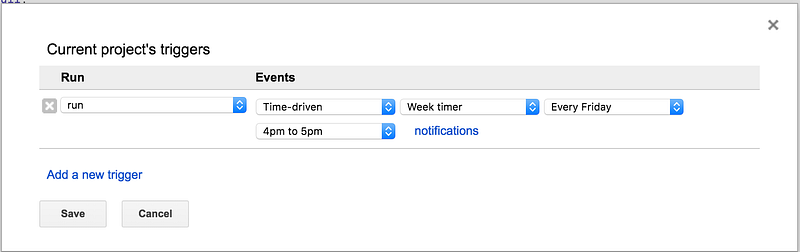
Edit -> Current’s project’s triggers
> We have our serverless implementation of the scheduled services which connect, execute, record and run, right from the Apps Script and the only thing, we needed, was having a Google account :-)
And that’s it!
Click [here](https://github.com/nigs1308/integration-recipes/blob/master/serverLessAppIntegrationAppScript.gs) to go to the [Github repository](https://github.com/nigs1308/integration-recipes/blob/master/serverLessAppIntegrationAppScript.gs) to access all the recipes, and here are the API references links:
1. [WorkBoard API](https://www.workboard.com/developer/) 2. [ServiceNow API](https://docs.servicenow.com/bundle/kingston-application-development/page/integrate/inbound-rest/concept/c_RESTAPI.html) 3. [Slack API](http://api.slack.com/) 4. [Mixpanel API](https://mixpanel.com/help/reference/jql/api-reference) 5. [Google Apps Script](https://developers.google.com/apps-script/)
Next, I will be updating the repository for the Salesforce REST API’s recipe and how to get the notification on your Amazon Echo on your WorkBoard schedule, stay tuned …
— Gaurav
Responses